> For the complete documentation index, see [llms.txt](https://hiveminddocs.gitbook.io/hivemind/llms.txt). Markdown versions of documentation pages are available by appending `.md` to page URLs; this page is available as [Markdown](https://hiveminddocs.gitbook.io/hivemind/environments/cyberpunk-city/tech-tools.md).
# Tech Tools
## **BP\_Lamp\_Small**
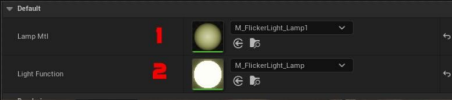
1\. slot for mesh emissive material with flickering\
2\. slot for Lightfunction
## **BP\_Lamp\_Long**
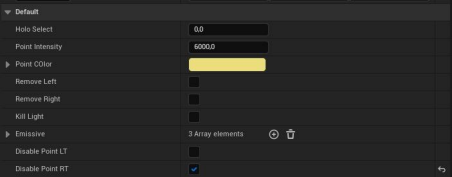
● Holo Select - Seed for random hologram texture
● Point Intensity - Point light intensity
● Point COlor - Color for Point Light
● Remove Left - remove left side Light and FX
● Remove Right - remove right side Light and FX
● Kill Light - remove light on both side
● Emissive - materials for emissive startup
● Disable Point LT - Remove only point light on left side
● Disable Point RT - Remove only point light on right side
## **BP\_MVK\_FloorGenerator**
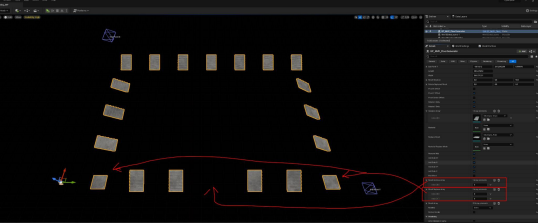
Tool to clone meshes by flat area
\
● End Point X/Y - Dummies to set size of floor
● Length/Width - Size of mesh XY
● Mesh Rotation - can rotate all copies by XYZ
● Mesh Rotation - can rotate replaced mesh copies by XYZ
● Point X/Y Offset - can add offset by axis X or Y (size of mesh X/Y \* 0.5)
● Point center Offset - offset center mesh on size of mesh X/Y \* 0.5
● Rotate X/Y only - we can allow rotate copies by axis
● Instance Array - set based mesh for copy
● Material - Set new material for base mesh (if needed)
● Replace Mesh - Set replace mesh
● Material Replace Mesh - Set new material for Replace mesh (if needed)
● Remove Mid - remove all mid copies
● Add Side by Axis - Keep copies only on Side +X -X +Y -Y
● Mesh Destroy Array - Can add ID which copy do we want to delete
● Mesh Replace Array - Can add ID which copy do we want to replace on new mesh ● Mobility - can set Mobility type
● Receive Decals - set Receive Decals
## **BP\_MVK\_CloneLineTool**
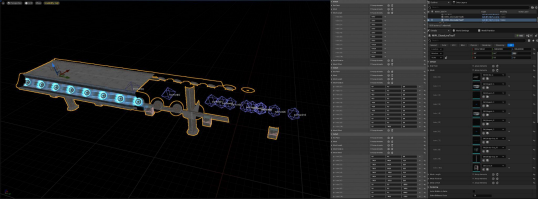
Tool to clone array ob meshes by line with control rotation and offset
● End Point - Dummies to set distance for clone meshes
● Mesh - Set Array cloned Meshes (can set any count)
● Mesh Length - set length for each meshes by X Axis
● Mesh Rotation - Set rotation for meshes by XYZ
● Mesh Offset - Add Offset position fo Mesh by XYZ
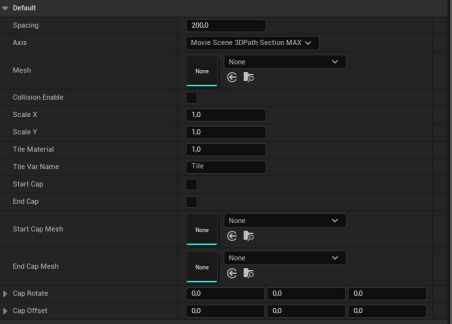
## **BP\_MVK\_SplineMeshTool**
Tool to clone mesh by spline
● Spacing - set distance between copies
● Axis - Set axis direction meshes
● Mesh - Set static mesh
● Collision Enable - set collision
● Scale X/Y - can scale mesh by axis
● Tile material - set tiles for materials
● Tile Var name - set name variation inside material to control Tile
● Start/ End cap - allow add mesh on first/last point on spline
● Start/End Cap Mesh - set mesh for First/Last point of spline
● Cap Rotate - can rotate meshes
● Cap Offset - can add offset fpr meshes
Also you can scale spline points to change thickness of spline mesh
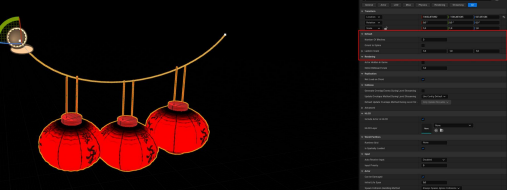
## **BP\_Splines\_Lantern**
Tool for china lantern
● Mumber of Meshes - set copy count
● Orient to spline - change mesh orientation by Z axis or by Spline normal
● Lantern Scale - Set scale for Lanternsr
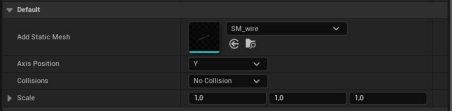
## **BP\_wires**
Simple tool for wires
● Add Static Mesh - set spline mesh
● Axis Position - Set direction mesh
● Collision - set collision
● Scale - can set scale of mesh
Modular BP **BP\_Building, BP\_House\_Shop\_E, BP\_Shop\_A, BP\_Shop\_B, BP\_Stairs\_A** In these BPs, you can quickly change the configuration of different types of buildings, this allows you to quickly get many different building options.
The settings there are intuitive