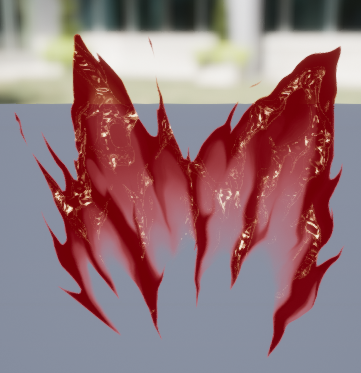
> For the complete documentation index, see [llms.txt](https://hiveminddocs.gitbook.io/hivemind/llms.txt). Markdown versions of documentation pages are available by appending `.md` to page URLs; this page is available as [Markdown](https://hiveminddocs.gitbook.io/hivemind/vfx/stylized-blood-vfx/documentation-stylized-blood.md).

# Documentation (Stylized Blood)

## <mark style="color:blue;">Materials</mark> <a href="#k9ojxcfhz9ik" id="k9ojxcfhz9ik"></a>

### Master Materials <a href="#ppoc1d7pim3r" id="ppoc1d7pim3r"></a>

<table data-view="cards"><thead><tr><th></th><th data-hidden data-card-cover data-type="files"></th></tr></thead><tbody><tr><td><p><strong>M_LiquidBase</strong> </p><p>Master material for particle-based effects</p></td><td><a href="/files/bLEqS6LNej8JvpnhnOR5">/files/bLEqS6LNej8JvpnhnOR5</a></td></tr><tr><td><strong>M_LiquidDecal_Dynamic</strong><br>Deferred decal but with dissolving animation functionality</td><td><a href="/files/YUHKMFpMJSvg3bP1vV4C">/files/YUHKMFpMJSvg3bP1vV4C</a></td></tr><tr><td><p><strong>M_LiquidDecalBase</strong></p><p>Basic deferred decal-based material</p></td><td><a href="/files/zBEmfK2Lyj5AHCrflgyR">/files/zBEmfK2Lyj5AHCrflgyR</a></td></tr></tbody></table>

### Texture Samplers <a href="#id-2fm5az4uua5w" id="id-2fm5az4uua5w"></a>

\ <img src="/files/WlNZF7lfJHN3PMmRfFEi" alt="" data-size="original">

{% hint style="info" %}
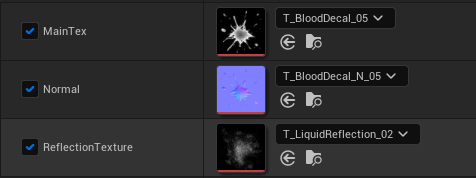
The material requires 3 main maps in order to mimic a liquid-like shine\
\
**Alpha Mask Map** - This is the primary source of the color modifiers, dissolve, and opacity.**Normal Map and ReflectionTexture** - By sampling these two textures you mimic a fake specular behavior.
{% endhint %}

### Modifiers ![](/files/q78XB69Lr5UQOpKzAdfS) <a href="#id-7bi33pm0m2yr" id="id-7bi33pm0m2yr"></a>

{% hint style="info" %}
**NormalStrength** - Normal map intensity control\
**Power** - Alpha Mask exponent control used for lerping two colors\
**Softness** - Edge Softness

**SpecularPower** - Fake specular exponent control\
**SpecularValue** - Fake specular intensity multiplier
{% endhint %}
<div align="left"><img src="/files/MCK7WNvaEvWKOXStfrdi" alt="Power: 2 | Softness: 0.0 | SpecularPower: 4 | SpecularValue: 50"></div>

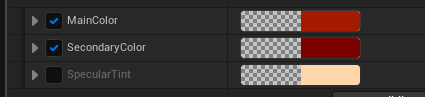
<div align="left"><figure><img src="/files/UVy2Aatg2wxY7PqEi4Ow" alt=""><figcaption><p>Colors</p></figcaption></figure></div>

<div align="left"><img src="/files/Vfr13qC7zvRwRMOnb7BX" alt=""></div>

***

## <mark style="color:blue;">Niagara Effects</mark> <a href="#id-3w5hyeitcx4x" id="id-3w5hyeitcx4x"></a>

### Stab <a href="#ow5kgo7p88n9" id="ow5kgo7p88n9"></a>

<figure><img src="/files/NYXeZq2pYXGeNvJEZCnQ" alt=""><figcaption></figcaption></figure>

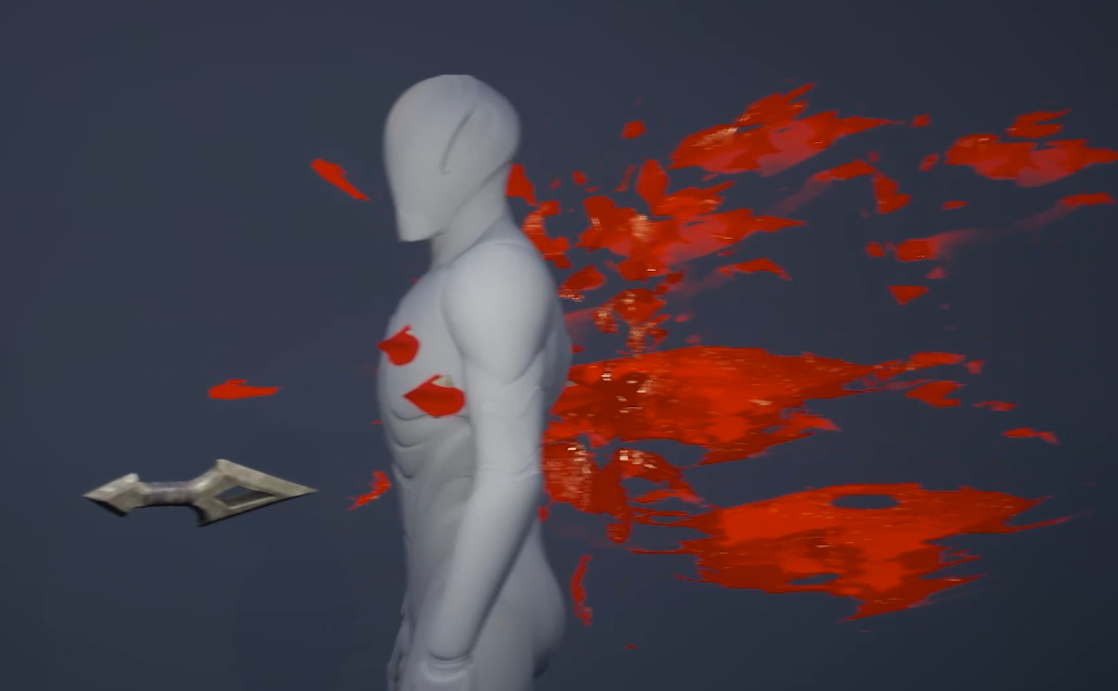
![](/files/6nq3KIEi0AeWWzLcWKyu)The Particle Effect should be towards the direction of the stab.<br>

### Slash ![](/files/W1GIYbe5Smbi2ue8ykej) <a href="#wgqw7sazee6q" id="wgqw7sazee6q"></a>

### Bullet Hit ![](/files/tBbgPHGnHKTxG4l4u0PR) <a href="#id-8e893g5xze8q" id="id-8e893g5xze8q"></a>

### Splash/Burst ![](/files/LXmsBwqtisVF4RE9UxMy) <a href="#rwh4a0rdtel1" id="rwh4a0rdtel1"></a>

### Splatters <a href="#s3dn0o8mhsyx" id="s3dn0o8mhsyx"></a>

#### Particle Decal Renderer (NEW) <a href="#lsgwbpcouwvj" id="lsgwbpcouwvj"></a>

\- Can disable projection to Meshes using *ReceiveDecals* boolean.\
\- Uses Deferred Decal rendering. Supports PBR.

\- Reacts to lighting condition (LIT)

![](/files/sajyeXGsn27a3bFs08HX)

#### ![](/files/04bRXZckOc6XWfBmOVj1) <a href="#id-1nwz9ha7rnxf" id="id-1nwz9ha7rnxf"></a>

#### **Removing the Emissive**

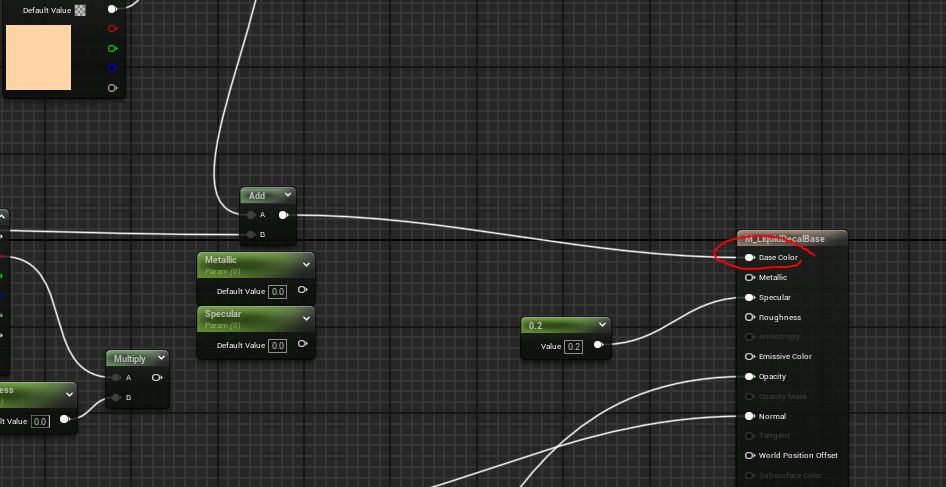
By default the *M\_LiquidDecalBase* uses emissive channel for it’s color.\
In this case you may experience a glowy shading in dark light setting.

For you to utilize the lighting condition. You’ll need to make modification for the *M\_LiquidDecalBase.*

<figure><img src="/files/dsPSn3QNEacTVDQwuVpg" alt=""><figcaption></figcaption></figure>

As you can see, the color is connected to the EmissiveColor channel.

<figure><img src="/files/ER54lseNhAgddYLOaHUd" alt=""><figcaption></figcaption></figure>

Switch the connection to the *BaseColor.* Make sure to delete the *divide to EyeAdaptation*.

<figure><img src="/files/4noNJIUgvydEBya9jP0T" alt=""><figcaption></figcaption></figure>

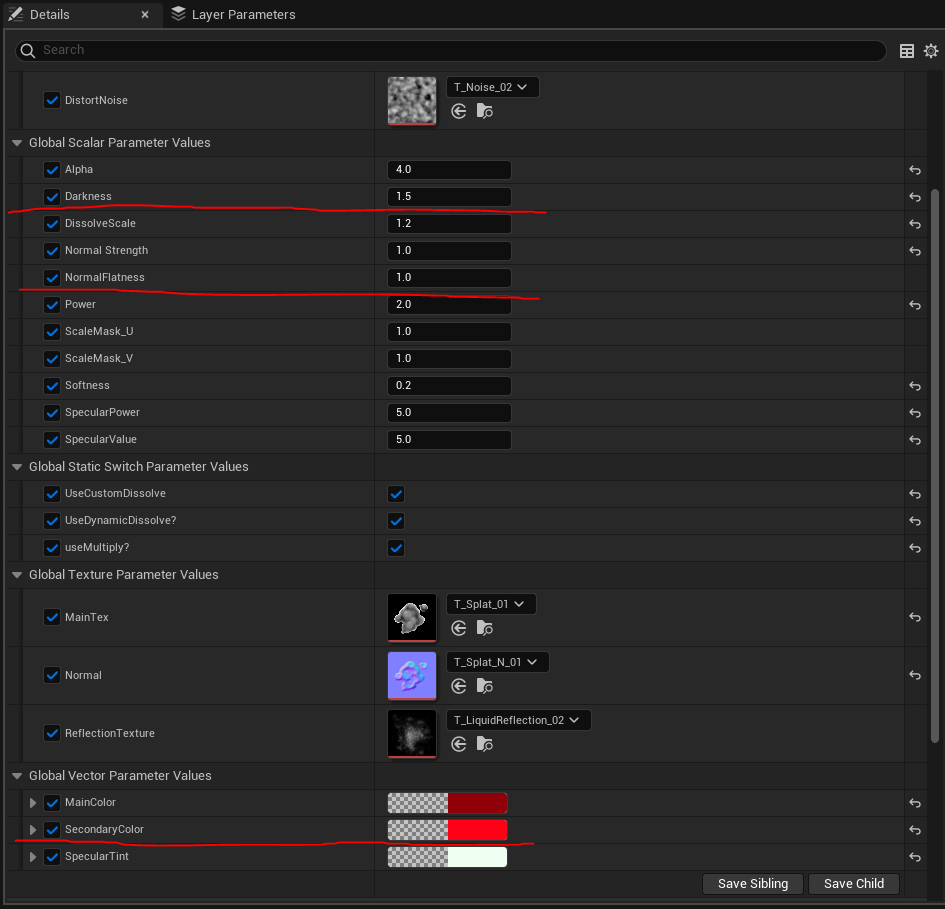
{% hint style="info" %}
You have to modify these parameters on the *MaterialInstance* to reduce the dark contrast shading.
{% endhint %}

Darkness: **1.5**\
NormalFlatness: **1.0**\
SecondaryColor: **FF001700**

#### Shader Based Projection (Legacy) <a href="#id-20t6jphuo9gk" id="id-20t6jphuo9gk"></a>

* *ReceiveDecals* boolean wont work
* Uses Translucent Rendering (Non PBR)
* A cheaper alternative if you don’t mind lighting conditions
* UNLIT

![](/files/XlrFnTK6oLyKoSwI7La9)

![](/files/nQkI7ZVMenWiFxsxTTYg)

* Automatically rotate based on the normal of the collision
* Exposed Param that you can modify to create desired splatter behavior
* *LifetimeMultiplier*
* *ScaleMultiplier*
* *SpawnCount*
* *VelocityMultiplier*

### Artery/Dripping <a href="#ocxy3c5ogkb6" id="ocxy3c5ogkb6"></a>

### ![](/files/f1uXQXFb3Lq0drBeCga5) <a href="#id-4a6gffos3gcb" id="id-4a6gffos3gcb"></a>

***

## <mark style="color:blue;">Shader Controls</mark> <a href="#id-26xwdlx1fcib" id="id-26xwdlx1fcib"></a>

<figure><img src="/files/To3X39Tnai5ufpmKlVxj" alt=""><figcaption></figcaption></figure>

<div align="left"><figure><img src="/files/6AQJqkN9cskrYzqdIBIJ" alt=""><figcaption><p>Build up animation for the puddles via Dissolve Function</p></figcaption></figure></div>

<div align="left"><figure><img src="/files/JREVbqaE4EaqiQJT4bHe" alt=""><figcaption><p><em>Dissolve Param (0-1)</em></p></figcaption></figure></div>

***

## <mark style="color:blue;">Demos</mark> <a href="#r8ooylr37z0h" id="r8ooylr37z0h"></a>

### Use Case - Blood Linger and Accumulation <a href="#qpecjksen1d9" id="qpecjksen1d9"></a>

<table data-card-size="large" data-view="cards"><thead><tr><th></th><th data-hidden data-card-cover data-type="files"></th></tr></thead><tbody><tr><td></td><td><a href="/files/sKM8C5mVjd49tLVFTDa8">/files/sKM8C5mVjd49tLVFTDa8</a></td></tr><tr><td></td><td><a href="/files/ltQWEqHXe0oPbZC0jSE4">/files/ltQWEqHXe0oPbZC0jSE4</a></td></tr></tbody></table>

Attach *NS\_Dripping\_Dynamic* to desired bone/socket location.\
The emitter has a collision event that spawns splashes and splatters.\
Combine it with a decal component for an accumulation effect.

<div align="left"><figure><img src="/files/zdjUKzJMDBhKgwAHyd9m" alt=""><figcaption></figcaption></figure></div>

<figure><img src="/files/hLIRzPDwAMeEUXmIhbKB" alt=""><figcaption></figcaption></figure>

{% hint style="info" %}
Use a curve to modify the timing in order to match blood-dripping behavior. Then use the value to drive the *Dissolve* parameter.
{% endhint %}

<figure><img src="/files/kE3J60fACqSahQbHi4Dc" alt=""><figcaption></figcaption></figure>

{% hint style="info" %}
You can check more demos by going to this map. **Showroom\_Demo**

While on this map, just simply play the Level Sequence.
{% endhint %}

<table data-card-size="large" data-view="cards"><thead><tr><th></th><th data-hidden data-card-cover data-type="files"></th></tr></thead><tbody><tr><td></td><td><a href="/files/7PE1dXKb2BT2COW16z7N">/files/7PE1dXKb2BT2COW16z7N</a></td></tr><tr><td></td><td><a href="/files/oimdTZ27ouCLvKhQBkS0">/files/oimdTZ27ouCLvKhQBkS0</a></td></tr></tbody></table>

***

## <mark style="color:blue;">Affect by DOF</mark> <a href="#id-2b6y30wtwlp3" id="id-2b6y30wtwlp3"></a>

<div align="left"><figure><img src="/files/PXmdWflEBLyYDbDXr0cW" alt=""><figcaption><p>Go to LiquidBase</p></figcaption></figure></div>

<div align="left"><figure><img src="/files/vWtgPaJTKCyEgdQuMzpr" alt=""><figcaption><p>Still inside the LiquidBase (Master Material)</p></figcaption></figure></div>

On the left side details panel. Find **TranslucencyPass** and Change to **Before DOF.**

## Reducing Steep Angle Artifacts <mark style="color:red;">(UE 5.5 Deprecated)</mark>

Decal material instances derived from master materials such as `M_LiquidDecalBase` and `M_LiquidDecal_Puddle` have control to lessen the decal projections artifacts.

<figure><img src="https://lh7-rt.googleusercontent.com/docsz/AD_4nXcElQ1hodX93kE-5wWPjWFsAIMds9dhcpj6FPVF43evEq5Hy089xIOQdABA0ZcjIuU5dvLVbVT7TZvMEa3X7pv-V2IoTAyjXwY5x0cDt6Q2xpWrKxRYoi1Z44aBcazw5gUWwqlxpIazxLzlHAgKB0AVTi6C?key=sfvAq9LVQCZwT0L3xT0JbA" alt=""><figcaption></figcaption></figure>

<figure><img src="https://lh7-rt.googleusercontent.com/docsz/AD_4nXdfHMGCciktEpzgcuMuvNHEdCjN1I45M_eF6H5tsVgXEJRusMneQr5AHZres7i2ekVj3SJdetBTLrq5kA3sHcDESqZYww_HOtFlKtg-yNVzgMXOMLtAqOwZzAXPiao7sf3MR6hAA770dZGPXWNWpI-N7SE?key=sfvAq9LVQCZwT0L3xT0JbA" alt=""><figcaption><p>ArtifactFade_Opacity = 1.0</p></figcaption></figure>

<figure><img src="https://lh7-rt.googleusercontent.com/docsz/AD_4nXdIyZlgd99REen5HBvRXdfZ5EsMbdaRHsmKnuFjXLpGdELCzx9D8qWx1XFftnkVElrF2EN7sz4g8Kds8IC3EKzZVwV4ys0xSPrypq-Dx0Qy2DJAwmbxxZjzFvyi-6CdVvBC0VFBAgvI2ty1CFHaQjoDEscb?key=sfvAq9LVQCZwT0L3xT0JbA" alt=""><figcaption><p>ArtifactFade_Opacity = 0.0</p></figcaption></figure>

## 5.5 New DBuffer Implementation

<figure><img src="https://lh7-rt.googleusercontent.com/docsz/AD_4nXfLWSdd4piwsT2IWgTEB7Bsez8-bcOYqvY_X4TRm8sMd42W3i95YMxJww33lJRpBZZJqqn87tWC3rKEpsDsyQKB8kQfDW_tQaM4sTP8F_xkYKT-h6T3KnvdqRV9j_HWuJzb0B0P?key=sfvAq9LVQCZwT0L3xT0JbA" alt=""><figcaption></figcaption></figure>

Go to Mannequin master material<br>

<div align="left" data-full-width="false"><figure><img src="https://lh7-rt.googleusercontent.com/docsz/AD_4nXfkN-GzyeeMbl0IgdeIdR55DYDD5TrJS95w1xkO_HH0iv_1IQqYUYaYLIU-VNC9ptWyY5fXl7OvRPpDtAWgvhmFesVN0P589nLI-fd3vh_Sf-E8OB0FZLE5uzo7jY2YU9BY2XH0RQ?key=sfvAq9LVQCZwT0L3xT0JbA" alt=""><figcaption></figcaption></figure></div>

\
Check Decal Response (DBuffer) to make sure it is Color, Normal, Roughness.

<figure><img src="https://lh7-rt.googleusercontent.com/docsz/AD_4nXe3y5w75gvTgtsqmCXbRXr2UbecrRnKyIXbgle3fzAke25in_9yfV7Dut2b_GLBzXc78-ujSL5gTzPTgr_MTtYBNP_Dk_zRagzugHf6OGywZ7NVnZ4DCyKIkwvH9meXiP1eL6Ps7w?key=sfvAq9LVQCZwT0L3xT0JbA" alt=""><figcaption></figcaption></figure>

Feed DBuffer(BaseColor) with this formula

<figure><img src="https://lh7-rt.googleusercontent.com/docsz/AD_4nXfLwNx5Al439DhxVdgpxS8ufskuZ0ffFuv93AOw-8yjOFRDoIijrr0kRb7t79JkEMiFwRL_ItiByAZ7jc-yqPbU12mBzxRfzEd9811GVSRUrMIgItg2UcLDDNDt7GCZxCm3ENaOfg?key=sfvAq9LVQCZwT0L3xT0JbA" alt=""><figcaption></figcaption></figure>

For Roughness

<figure><img src="https://lh7-rt.googleusercontent.com/docsz/AD_4nXfw7JvA_s5ir_Dow0UBtELvaH0TeZ2wBg1cFm5mbehzKV6H3WeEba3ZPkTYoA0J1QOi7uYKAlaPBL8LUiSbv2BP7Cd2vEhxipKF2iuSmr6wPrDAZSxiyTJyFnku68wtmbuIVw4P?key=sfvAq9LVQCZwT0L3xT0JbA" alt=""><figcaption></figcaption></figure>

For Normal (1st)

<figure><img src="https://lh7-rt.googleusercontent.com/docsz/AD_4nXe09vKL9d0BTsbO46c7ebhyCvC_oOy72GmRB-PPeW0cvOje_ezuIziIBZosyaiGyBIP15k4A1tQlLx4jNaA5SUpfLZx7AoWPrBpudItV3P9Xd9w4dUecuvzbMQ-8eYJrCfb2CFbng?key=sfvAq9LVQCZwT0L3xT0JbA" alt=""><figcaption></figcaption></figure>

For Normal(2nd)


---

# Agent Instructions
This documentation is published with GitBook. GitBook is the documentation platform designed so that both humans and AI agents can read, navigate, and reason over technical content effectively. Learn more at gitbook.com.

## Querying This Documentation
If you need additional information that is not directly available in this page, you can query the documentation dynamically by asking a question.

Perform an HTTP GET request on the current page URL with the `ask` query parameter:

```
GET https://hiveminddocs.gitbook.io/hivemind/vfx/stylized-blood-vfx/documentation-stylized-blood.md?ask=<question>
```

The question should be specific, self-contained, and written in natural language.
The response will contain a direct answer to the question and relevant excerpts and sources from the documentation.

Use this mechanism when the answer is not explicitly present in the current page, you need clarification or additional context, or you want to retrieve related documentation sections.